Category: IT

  • Predicting the Future of IoT Data: A Practical Guide to Machine Learning

    Predicting the Future of IoT Data: A Practical Guide to Machine Learning

    In many businesses today, installing IoT devices and collecting sensor data has become standard practice. Your organization might be gathering thousands of data points—such as voltage, temperature, or load—every single day. While visualizing this historical or real-time data on a dashboard is a valuable first step, it only tells you what is happening right now.

    But what if your system could tell you exactly how many hours of operational life your device has left before it stops?

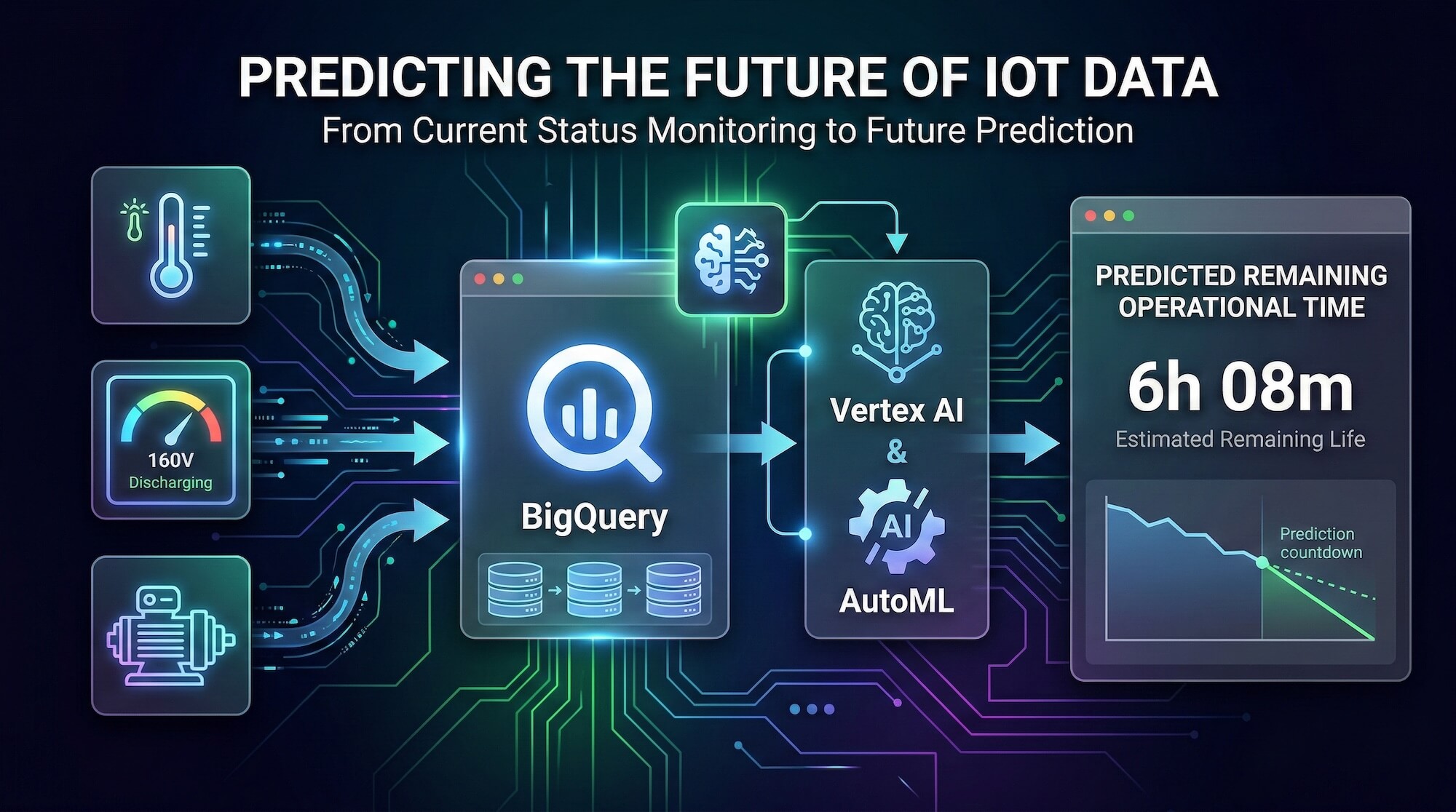
    Transitioning from “current status monitoring” to “future prediction” might sound like a complex task reserved for enterprises with massive data science teams. You may think, “Building AI models is too expensive and requires deep mathematical expertise.” However, it is entirely possible to build a custom predictive architecture tailored to your specific hardware. By integrating BigQuery, Vertex AI, and AutoML, you can transform scattered IoT sensor data into a highly accurate, real-time forecasting engine.

    The Three Technologies for Prediction

    To make your data predictable, you need a system that can securely store historical data, perform feature engineering to find hidden correlations, and process real-time inference requests. Here is how this architecture functions:

    1. BigQuery: The Data Ingestion and Preprocessing Foundation

    Before you can predict the future, you must establish a baseline from the past. Every second of sensor data your devices generate is securely ingested into BigQuery. As a highly scalable data warehouse, BigQuery stores tens of thousands of historical operation and discharge logs. It acts as the primary data preprocessing environment where raw data is cleaned and structured before being passed to the machine learning engine.

    2. Vertex AI & AutoML: Automated Feature Engineering and Regression

    Prediction models cannot be built simply by plotting current voltage against time. To predict remaining hardware life accurately, we must analyze historical discharge cycles and identify multi-variable correlations. Inside Vertex AI, AutoML handles this complex process. Rather than manually testing algorithms, AutoML automatically performs feature engineering and selects the optimal regression model based on your BigQuery dataset. It autonomously maps specific voltage drop patterns to their corresponding remaining operational timelines.

    3. Real-Time Inference Application

    Once AutoML finishes building the model, it is deployed directly within BigQuery using ML.PREDICT. This means your frontend applications can execute predictions using standard SQL queries without needing a separate, dedicated ML hosting server. For instance, in our recent setup, a custom dashboard sends current voltage readings to a backend API. Within milliseconds, the API queries the trained model and returns the predicted remaining operational minutes to the user.
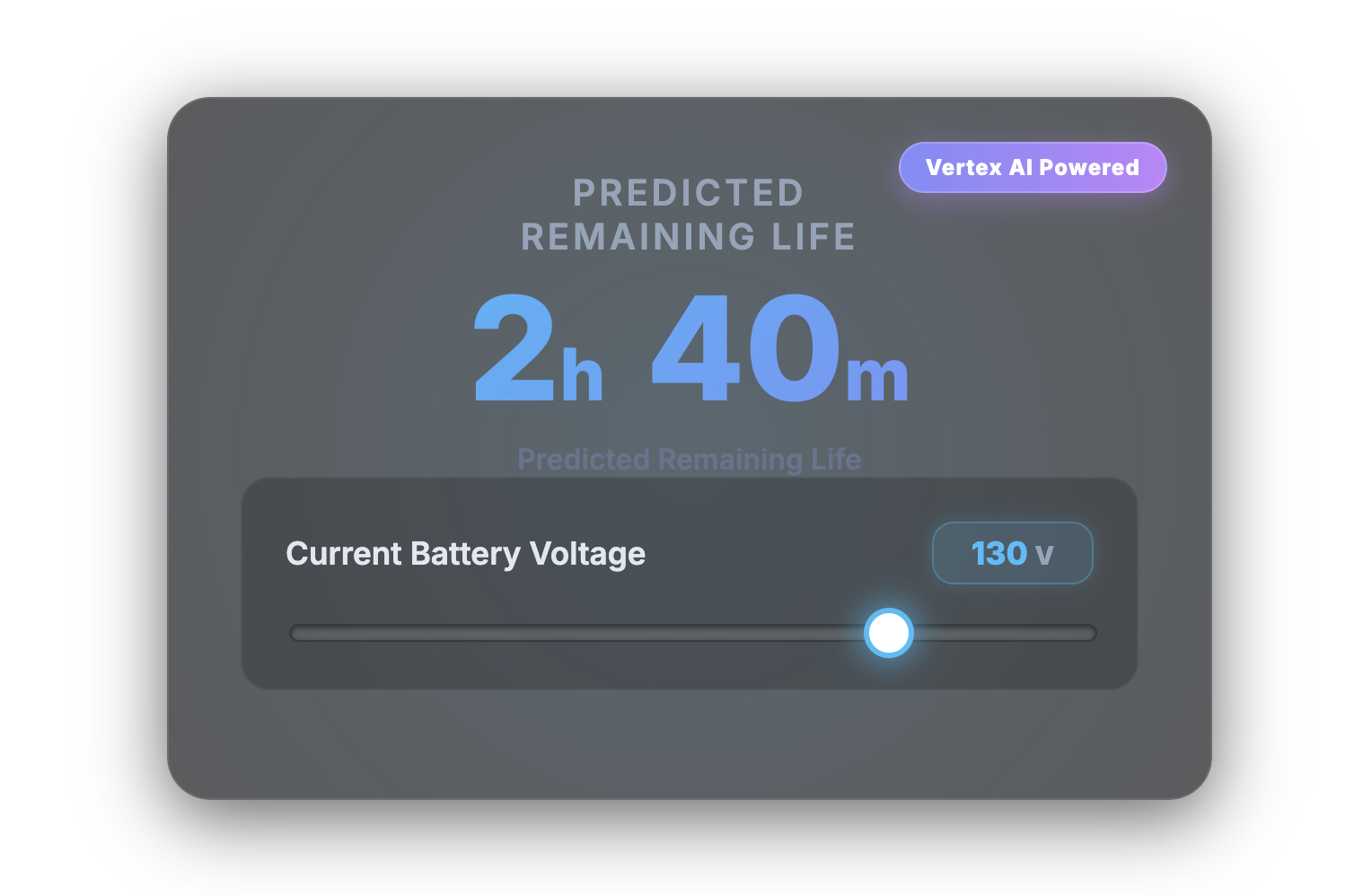
    Predicted Remaining Life  Demo Page

    Moving from Reactive to Predictive

    You don’t need to write complex algorithms from scratch to benefit from machine learning. By utilizing BigQuery to structure historical data and allowing Vertex AI and AutoML to discover predictive rules autonomously, your business can shift from merely reacting to real-time IoT alerts to proactively planning maintenance and optimizing hardware lifecycles.

    At TSG USA Inc., we specialize in turning raw IoT data into actionable intelligence. Whether you need Vertex AI integration or comprehensive Google Cloud architecture, our team is ready to build your next predictive system. Contact us today to get started.
  • Designing a Custom Database: A Practical Guide for Small Businesses

    In small businesses, it is often the case that various data used for administrative tasks are stored in scattered Excel files. While Excel is a great tool for analyzing numerical data, it is not well-suited for searching, aggregating, bulk updating non-numerical data, or joining data from multiple files. One simple solution to this “Excel pain” is to use relational databases instead.

    You may think, “Licenses for database software are expensive and only for big companies,” or “We can’t hire people to build and operate databases because it’s complicated and requires special expertise.” However, we can show you that it’s not so difficult to build a small custom database tailored to your needs. Even better, there are open-source solutions to host your database.

    What You Need Before Getting Started

    Before you get your hands dirty building a database, you need the following:

    • A clear objective for your database
    • An understanding of (or curiosity to learn) the first, second, and third normal forms of database design
    • The ability to draw an Entity Relationship Diagram (ERD)

    The second and third items may sound intimidating if you’ve never heard of them. But don’t worry—you don’t need to dive deep. A surface-level understanding is more than enough, and no advanced math is required.

    Understanding Relational Databases

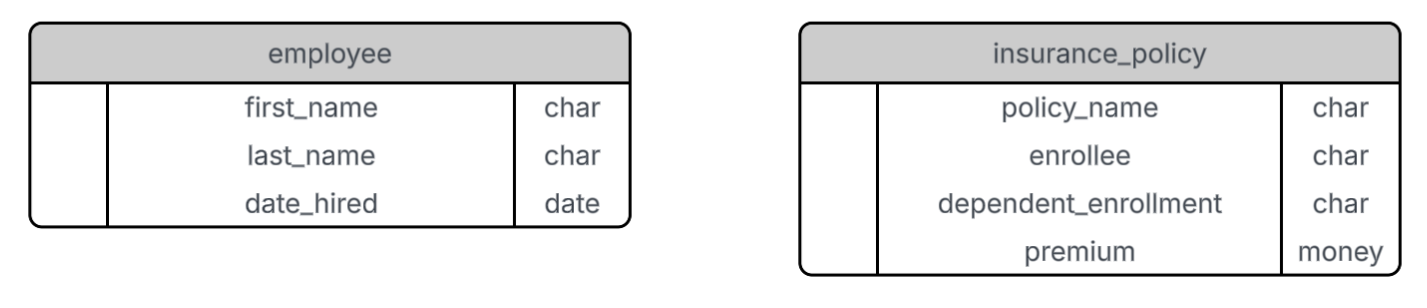
    Relational databases are composed of tables organized for specific purposes. Let’s assume we want to build a database to store information on insurance enrollment in your company. We want to be able to look up which employees are enrolled in which insurance policies—and vice versa. To begin, we’ll create two tables: one for employees and one for insurance policies.

    Each row in a table represents an entity (e.g., an employee or a policy), and each column represents an attribute (e.g., first name or premium). For example, the employee table includes attributes such as first name, last name, and date hired. The insurance policy table includes attributes such as policy name, enrollee, premium, and dependent enrollment status (e.g., “employee only”, “employee and spouse”, or “family”).

    First Normal Form (1NF)

    According to the first normal form, every row in a table must be unique. Let’s consider our employee table. If the company has two employees named Ichiro Suzuki who were both hired on the same day, the table would contain duplicate rows—violating 1NF.

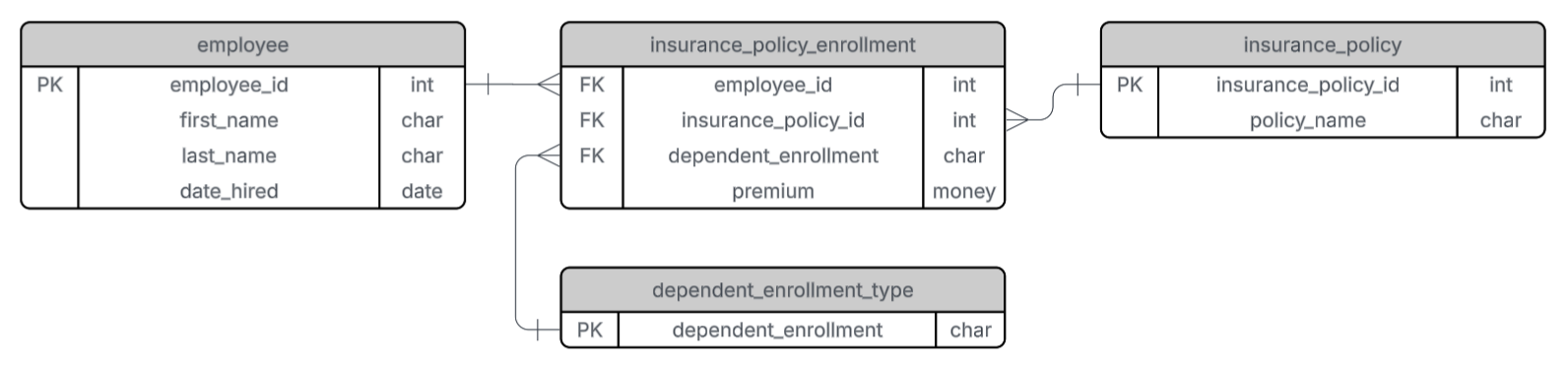
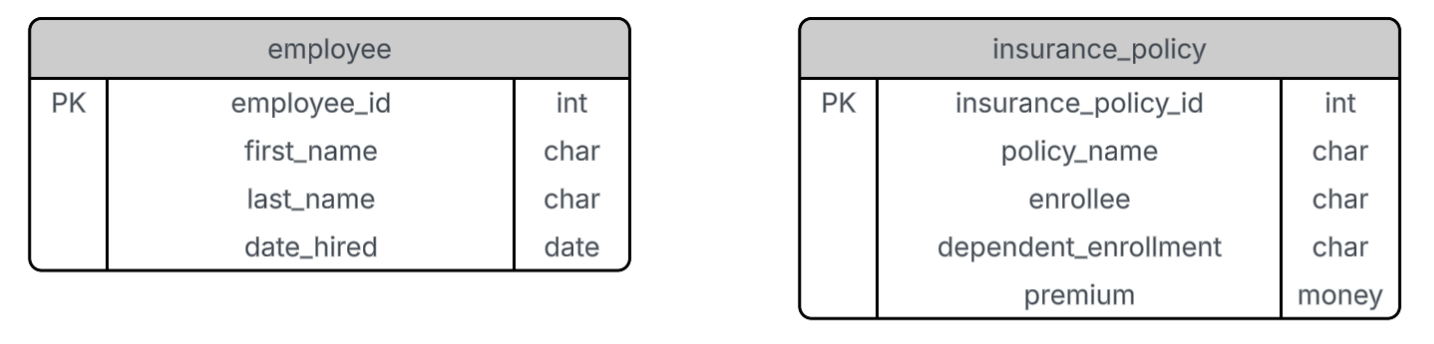
    The solution is to add an identification number to each table to uniquely identify each row. This is known as a primary key (PK). In our case, we add employee_id and insurance_policy_id as the primary keys of the employee and insurance policy tables, respectively.

    Second Normal Form (2NF)

    The second normal form requires that each non-primary-key attribute in a table must be fully dependent on the primary key. Our employee table now meets this requirement because all attributes (first_name, last_name, date_hired) depend solely on employee_id.

    However, in the insurance policy table, attributes like enrollee, dependent_enrollment, and premium are not determined solely by insurance_policy_id, since each policy can have multiple enrollees. These attributes depend on the relationship between employees and policies.

    To address this, we create a new table, insurance_policy_enrollment, with employee_id and insurance_policy_id as foreign keys (FKs). This table represents who is enrolled in which policy.

    Next, we move the dependent_enrollment and premium attributes into the insurance_policy_enrollment table, because they depend on both employee_id and insurance_policy_id.

    Third Normal Form (3NF)

    The third normal form requires that every attribute must depend only on the primary key—not on another non-key attribute.

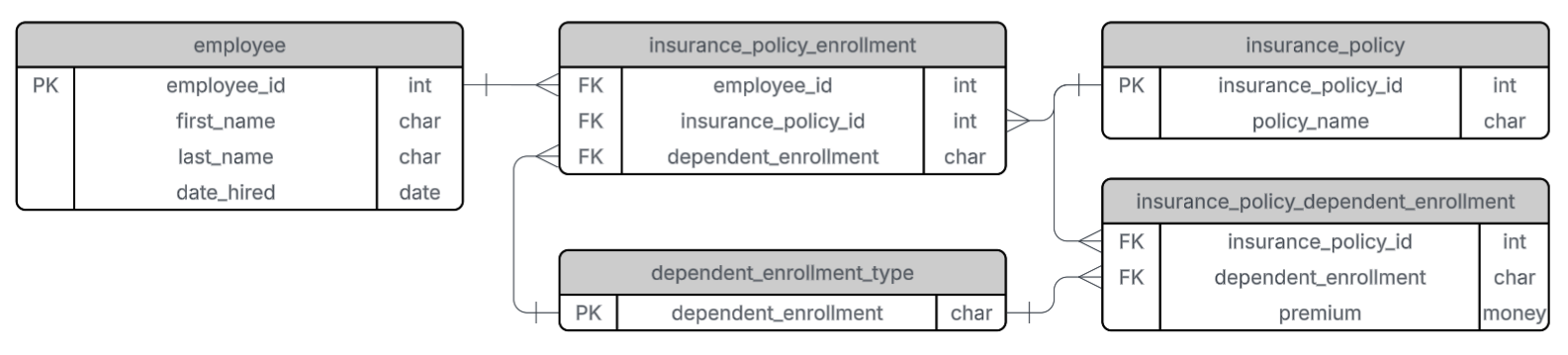
    Our employee table already satisfies this condition. Now, let’s check the insurance_policy_enrollment table. Here, the combination of employee_id and insurance_policy_id is the primary key. But attributes like dependent_enrollment and premium are not strictly dependent on this combination. For example, if an employee has a child, their dependent enrollment status might change, which in turn might affect the premium.

    To normalize further, we:

    1. Create a new table, dependent_enrollment_type, where dependent_enrollment is a key.
    2. Link this to the insurance_policy_enrollment table via a foreign key.
    3. Create another table, insurance_policy_dependent_enrollment, to map the relationship between insurance policy and dependent enrollment type with associated premiums.

    Now all tables meet the requirements of the third normal form.

    Final Touch: Add Integer Primary Keys

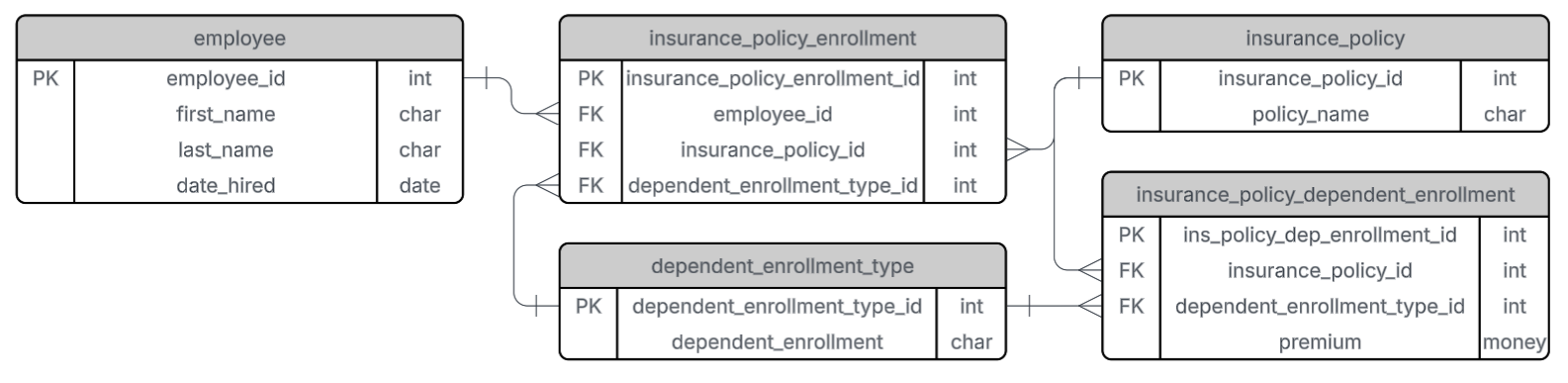
    As a best practice, each table should have an integer primary key for better performance and easier management, especially when using database software such as MySQL or PostgreSQL.

    Wrapping Up

    Our objective was to build a database that can help you identify:

    • Which employees are enrolled in which insurance policies
    • Which insurance policies are enrolled by which employees

    This is accomplished through queries that join the employee, insurance_policy_enrollment, and insurance_policy tables.

    When renewing a contract with your insurance provider, premiums may change. Instead of manually updating every row in a spreadsheet, you only need to update the insurance_policy_dependent_enrollment table—reducing the risk of human error.

    Best of all, free and open-source tools like MySQL and PostgreSQL can host your database effortlessly.

    Let’s Chat!

    Are you interested in building custom databases for your organization but not sure where to start? Let’s talk! Feel free to reach out to us on our LinkedIn page. We’d love to learn about your needs and help you find a solution.